Proxmox VE now ships an arm64 build. We measured how it performs on an inexpensive ARM box, and how fast the box can go. NVMe/TCP reads make a good test because they lean on the NIC, PCIe, the I/O memory management unit (IOMMU) and the CPUs at the same time. Getting Proxmox to boot and stay up on this box had a few wrinkles of its own, which we wrote up on the Proxmox forum: the black screen after initrd, the hard reset every 20 minutes, and the firmware power cap. All measurements were taken on the Proxmox host itself, with no VMs involved. Guest performance is a separate question that we did not test.
The setup was simple: one GX10, one NVMe/TCP target, and two 200G cables between them.
- Host: ASUS GX10, NVIDIA GB10 (the DGX Spark SoC), 10 Cortex-X925 + 10 Cortex-A725 cores, one NUMA node
- OS: Proxmox VE 9.2 arm64, stock kernel 7.0.14-6-pve
- NIC: ConnectX-7, dual-port 200G, in-tree mlx5 driver, MTU 9000
- Target: Blockbridge NVME20 (AMD EPYC Zen 5), dual-port 200G
With the kernel NVMe/TCP initiator the box reads 28.1 GB/s of 1 MiB random IO. With SPDK, the userspace initiator from the Storage Performance Development Kit, it reads 28.9 GB/s. By our math the two Gen5 x4 PCIe links behind the ConnectX-7 top out at about 29.9 GB/s of NVMe payload, so those results are 94% and 97% of what the hardware can do.
Getting there took two kernel parameters. On a vanilla Proxmox installation the kernel initiator read 6.3 GB/s. The first parameter took it to 24.4 GB/s and the second to 26.5 GB/s.
The charts below show the climb, first for the kernel initiator and then for SPDK. Each bar keeps the changes above it and adds one more. The blue bar is where we ended up.
The kernel initiator gets almost all of its gain from the first change. SPDK starts much higher, and the second change does a little more for it than the first. The last row of the table is the calculated limit of the two PCIe links.
| Step | Change | Kernel initiator | SPDK |
|---|---|---|---|
| 0 | Proxmox defaults: strict IOMMU, MaxPayload 128 | 6.3 GB/s | 21.3 GB/s |
| 1 | iommu.strict=0 |
24.4 GB/s | 24.7 GB/s |
| 2 | pci=pcie_bus_perf (MaxPayload 512) |
26.5 GB/s | 28.8 GB/s |
| 3 | LRO on | 26.8 GB/s | 28.9 GB/s |
| 4 | Fewer reads in flight, IRQs pinned | 28.1 GB/s | 28.9 GB/s |
| Best single run in the set (SPDK, step 2) | 29.2 GB/s | ||
| Both PCIe links, calculated | 29.9 GB/s | 29.9 GB/s |
Reads in flight means the total across all four namespaces. Steps 0 to 3 ran at 160 in flight for the kernel initiator and 40 for SPDK, and step 4 drops those to 40 and 20. Step 4 also pins the NIC interrupts to the X925 cores, which on its own is worth less than 1%.
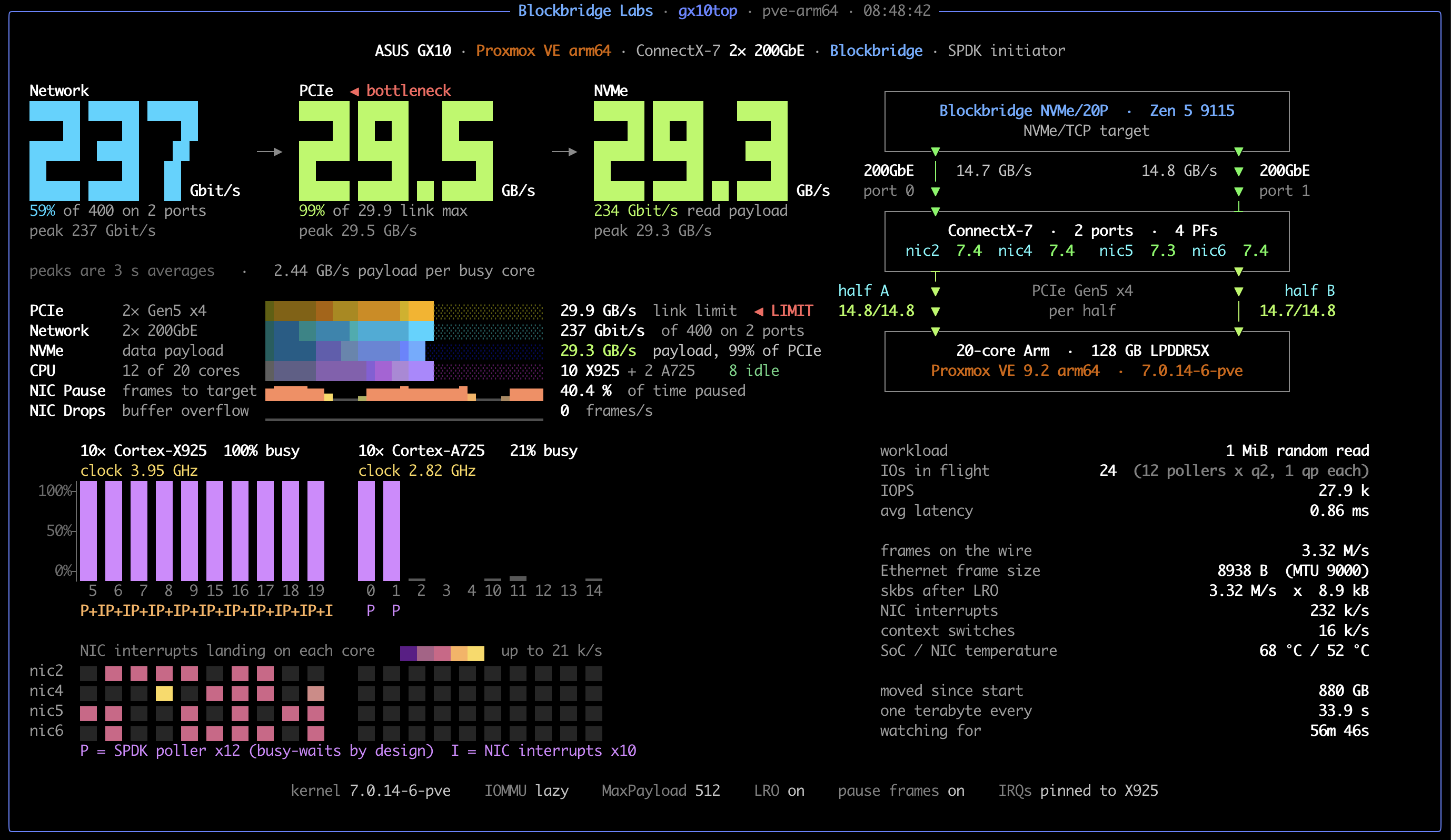
The table shows averages. On a good run, SPDK on 12 cores (ten X925 and two A725) with pause on and two reads in flight per core reads 29.3 GB/s of NVMe payload, which is 29.5 GB/s on the PCIe links. We say “on a good run” because it does not happen every time. The NIC spreads the TCP connections across its receive queues by hashing them, and some spreads are better than others, so you may need a few tries to land there. That is also what we think costs the 2% in the link table below.
Here is one of those runs, caught on the dashboard we kept up while testing. It reads the NIC counters, the PCIe link math and the SPDK output in one place, and it is why we could see exactly where the ceiling was. Click through for the full-size version.
Summary
- Take the IOMMU out of strict mode with
iommu.strict=0. Strict is the kernel default on arm64. On this box it holds the kernel NVMe/TCP initiator to about 6 GB/s, and nothing else you tune will change that. - Add
pci=pcie_bus_perfto the kernel command line. The firmware leaves the NIC’s PCIe links at a 128-byte MaxPayload, and that costs about 10% of each link. - The ConnectX-7 hangs off two independent Gen5 x4 links, and each physical function (PF) sits on one of them. Put an IP on all four PFs, each on its own subnet, and connect a controller through each, so that both links and both ports carry traffic.
- Set
arp_ignore=1andarp_announce=2. Two PFs share each physical port, and with the Linux defaults one of them can quietly take the other’s traffic. - Keep the number of reads in flight low for 1 MiB IO. About 40 suits the kernel initiator and 20 suits SPDK. Going deeper costs the kernel initiator 3 to 5%.
- Turn large receive offload (LRO) on. It is worth about 2% to the kernel initiator. Leave flow-control pause at its default, which is on.
- Check your work:
lspci -vvshould show MaxPayload 512 on the NIC, andrx_bytesinethtool -Sshould climb on every PF under load.
How We Measured
All of the numbers come from one set of 352 scripted runs, taken one change at a time across six boots. Unless we say otherwise, a figure is the average of at least two runs, and runs of the same configuration usually agreed within 1%. The script was designed to refuse to start a run if the kernel command line, IOMMU mode, MaxPayload or NIC settings were not what that run expected.
We only measured reads. Reads are the expensive direction for the host, since every byte is copied out of socket buffers on the way in. We did not measure from inside a VM.
A single PCIe link ran at 99% of its calculated capacity, and the pair ran at 97%, meaning that the target was not the limit.
How the ConnectX-7 Is Attached
You might expect the ConnectX-7 dual-port 200G NIC to sit on one x16
link. On the GB10 it sits on two independent Gen5 x4 root ports, and
those links are what limit it, not the ports. Each PF has its own MAC,
and lspci -tv shows the card as two dual-port PCI devices:
-[0000:00]---00.0-[01-0f]--+-00.0  Mellanox MT2910 [ConnectX-7]   <- nic2, physical port 0
                           \-00.1  Mellanox MT2910 [ConnectX-7]   <- nic4, physical port 1
-[0002:00]---00.0-[01-0f]--+-00.0  Mellanox MT2910 [ConnectX-7]   <- nic5, physical port 0
                           \-00.1  Mellanox MT2910 [ConnectX-7]   <- nic6, physical port 1

0000:00:00.0 PCI bridge: NVIDIA GB10 GEN5 X4 PCIe host
0002:00:00.0 PCI bridge: NVIDIA GB10 GEN5 X4 PCIe host
From here on we call the two root ports half A and half B.
Half A is PCI domain 0000. It is one Gen5 x4 link and carries
0000:01:00.0 (nic2) and 0000:01:00.1 (nic4). Half B is PCI domain
0002. It is the other Gen5 x4 link and carries 0002:01:00.0 (nic5)
and 0002:01:00.1 (nic6). Each half has its own bandwidth into
memory. Function .0 on each half is QSFP port 0 and function .1 is
port 1, so every physical port has one PF on each half. Every PF has
its own MAC, so a packet’s destination MAC picks its half.
  QSFP port   PF (netdev)            PCIe half  root port     link              host

  port 0 -->  nic2  0000:01:00.0 --+
  port 1 -->  nic4  0000:01:00.1 --+--> half A  0000:00:00.0  Gen5 x4  ~15 GB/s --+
                                                                                  +--> GB10 SoC
  port 0 -->  nic5  0002:01:00.0 --+                                              |    memory
  port 1 -->  nic6  0002:01:00.1 --+--> half B  0002:00:00.0  Gen5 x4  ~15 GB/s --+

  Each physical port appears twice: it has one PF on each half.
To see what this means in practice, we connected namespaces through different PFs and measured each layout with SPDK. In the chart, the first two bars are the same length: a second PF on the same half has no more PCIe to use. The third bar is longer because the second PF is on the other half, and it stops where it does because both PFs are on one 200G port. The last bar uses both ports and both links, and at 28.9 GB/s it is within 4% of what the two Gen5 x4 links can carry.
The table below adds the kernel initiator.
| Namespaces connected through | Limit | Kernel initiator | SPDK |
|---|---|---|---|
| nic2 only (half A) | one Gen5 x4 link | 12.7 GB/s | 14.8 GB/s |
| nic2 and nic4 (both on half A) | the same Gen5 x4 link | 14.5 GB/s | 14.8 GB/s |
| nic2 and nic5 (one per half, both on port 0) | one 200G port | 17.9 GB/s | 24.7 GB/s |
| All four PFs | both Gen5 x4 links | 28.1 GB/s | 28.9 GB/s |
The SPDK column is the one that shows what the links do; the kernel rows with fewer namespaces also run fewer fio jobs. One link on its own reaches 14.8 GB/s, 99% of what it can carry, and for SPDK a second PF on the same half adds nothing. To use both links you need a PF from each half, and to use both ports as well you need all four.
Our final layout is four subsystems with one namespace each. Every
subsystem has exactly one NVMe/TCP controller, and there is one
controller per PF, so two controllers enter through each PCIe half.
Nothing in this technote uses multipathing. We connect each controller
from the address of the netdev it should use, for example -w
10.0.0.2 for nic2 and -w 10.0.1.2 for nic5. Each PF is on its own
subnet, so routing picks the interface.
A single namespace with a controller on each half and NVMe native
multipath should work as well, though we did not test it in these
runs. If you try it, change the iopolicy. By default it is numa,
which on an SoC with one NUMA node picks one path and stays there:
echo round-robin > /sys/class/nvme-subsystem/nvme-subsysN/iopolicy
or make it permanent with options nvme_core iopolicy=round-robin
in /etc/modprobe.d/.
Two PFs on One Port Answer Each Other’s ARP
nic2 and nic5 share physical port 0, so both of them see every
broadcast that arrives on it. With the Linux default of
arp_ignore=0, an interface will answer ARP for any address the
host owns. Both PFs answer a request for nic5’s address, and the
target keeps whichever reply gets there first.
On one boot the target learned nic2’s MAC for nic5’s address.
Nothing looked wrong. All four controllers were connected and all
four namespaces were reading. But nic5 was receiving nothing, and
both of the port 0 namespaces were coming in through half A. The
kernel accepts the misdirected packets because the host owns the
address, and does not care which interface they arrived on. Whether
you hit this depends on which PF answered first, so it can come and
go from one boot to the next.
You can only see it in the per-PF rx_bytes counter from
ethtool -S. The rx_bytes_phy counter is per physical port, so it
looks fine. The fix is two sysctls that make each interface answer
only for its own address:
# /etc/sysctl.d/90-arp-per-interface.conf
net.ipv4.conf.all.arp_ignore = 1
net.ipv4.conf.all.arp_announce = 2
The target’s ARP cache will still hold the wrong entry after you apply them. Clear it on the target, or send a gratuitous ARP from each PF. Then check that all four PFs are receiving.
What the Links Can Carry: Calculated vs Measured
A Gen5 lane runs at 32 GT/s. Four lanes give 128 Gbit/s. After 128b/130b encoding, that is 15.75 GB/s. The NIC writes received data into host memory as PCIe packets that hold up to MaxPayload bytes each, with 20 bytes of header and framing around every one. At the firmware’s 128-byte MaxPayload that is 86% efficient. At 512 bytes it is 96%. Completion records, interrupts and link maintenance take roughly another 1%. What remains is about 15.0 GB/s of Ethernet frames per link. Not all of those frame bytes are data. Each frame carries Ethernet, TCP and NVMe/TCP headers, and with large receive offload (LRO) on they add up to about 0.4%. That leaves 14.95 GB/s of NVMe payload per link, or about 29.9 GB/s for the two.
The table below puts those calculated limits next to what we
measured. The measured column is NVMe payload as the initiator
counts it: fio’s bandwidth for the kernel initiator, and the total
that spdk_nvme_perf prints for SPDK.
| Calculated | Measured | Measured / calculated | |
|---|---|---|---|
| One link, SPDK (nic2 only) | 14.95 GB/s | 14.8 GB/s | 99% |
| Both links, SPDK | 29.9 GB/s | 28.9 GB/s | 97% |
| Both links, kernel initiator | 29.9 GB/s | 28.1 GB/s | 94% |
One link on its own runs at 99% of the math. With both links loaded, each carries about 2% less than it does alone. The likely cause is uneven receive-queue hashing: with 80 connections spread over four PFs, some queues get more flows than others, and the busiest one paces the rest. We did not chase it.
The Kernel Command Line
You need one parameter for the IOMMU and one for the PCIe links.
Add them to the kernel command line and reboot. Afterwards,
cat /proc/cmdline should contain:
quiet console=tty0 iommu.strict=0 pci=pcie_bus_perf
iommu.strict=0
On arm64 the kernel defaults to strict IOMMU mode, and the Proxmox
kernel keeps that default (CONFIG_IOMMU_DEFAULT_DMA_STRICT=y). In
strict mode every DMA unmap waits for the IOTLB, the IOMMU’s
translation cache, to be invalidated.
This one setting matters more than anything else we changed. The table below shows both IOMMU modes at both MaxPayload sizes, so you can see each one’s effect on its own:
| IOMMU mode | MaxPayload | Kernel initiator | SPDK |
|---|---|---|---|
| strict (default) | 128 (default) | 6.2 GB/s | 22.8 GB/s |
| strict | 512 | 6.2 GB/s | 28.4 GB/s |
lazy (iommu.strict=0) |
128 | 25.1 GB/s | 26.2 GB/s |
| lazy | 512 | 28.1 GB/s | 28.9 GB/s |
Every row here was run with LRO on and the reads in flight already tuned, so the strict and MaxPayload 128 rows come out a little higher than the same steps in the intro table, which had neither.
In strict mode the kernel initiator reads 6.2 GB/s whatever you do
with MaxPayload or pause. Its 99th percentile latency is above
60 ms, where lazy mode gives about 3 ms. A profile shows where the
time goes: arm_smmu_cmdq_issue_cmdlist takes 57% of all cycles on
the X925 cores. The SMMU is ARM’s system MMU, the IOMMU on this SoC,
and it has a single command queue. Every invalidation goes through
that queue, and the cores line up behind it.
Strict mode costs SPDK much less: under 2% at MaxPayload 512. Note the strict rows of the SPDK column, though: raising MaxPayload alone takes it from 22.8 to 28.4 GB/s. Strict mode and small PCIe packets compound, and we did not work out why. If you run SPDK, MaxPayload is the bigger of the two parameters. As for why SPDK suffers less than the kernel initiator overall, one difference we can measure is on the transmit side. In the lazy, MaxPayload 512 runs SPDK sends about 8 thousand packets per GB read, and the kernel initiator sends about 34 thousand.
We also tried an identity mapping, iommu.passthrough=1, which skips
translation entirely. It was no better than lazy mode: about 1% lower
for both initiators, on a different boot.
pci=pcie_bus_perf
The firmware leaves both of the NIC’s root ports at a 128-byte MaxPayload. Linux’s default policy only matches an endpoint to its parent, so the ConnectX-7 runs at 128 as well, even though both ends support 512:
# before
0000:00:00.0  DevCtl: MaxPayload 128 bytes   (root port)
0000:01:00.0  DevCtl: MaxPayload 128 bytes   (ConnectX-7 PF)
# after pci=pcie_bus_perf
0000:00:00.0  DevCtl: MaxPayload 512 bytes
0000:01:00.0  DevCtl: MaxPayload 512 bytes
Every PCIe packet carries the same 20 bytes of header and framing, so a 128-byte packet spends a much bigger share of the link on framing than a 512-byte one does. That is the difference between 13.5 GB/s and 15.0 GB/s per link. In the table above, going to 512 took SPDK from 26.2 to 28.9 GB/s in lazy mode, and the kernel initiator from 25.1 to 28.1 GB/s.
NIC Settings
LRO
Hardware LRO is worth about 2% with the kernel initiator and nothing
measurable with SPDK. We turn it on for all four PFs, but it is not a
big deal if you skip it. The setting is lost on reboot and on driver
reload, so put it in the interface configuration. ifupdown2 has a
keyword for it, and ifreload -a reapplies it after a manual driver
rebind.
auto nic2
iface nic2 inet static
    address 10.0.0.2/24
    mtu 9000
    lro-offload on
On Proxmox, check that it really applied. The kernel force-disables
LRO on any netdev that is enslaved to a bridge, and whenever
net.ipv4.ip_forward=1. In mlx5, LRO and rx-gro-hw are mutually
exclusive.
Pause
Leave flow-control pause on, which is the default. We expected pause off to be faster, so we ran a full depth sweep both ways. For the kernel initiator, pause on was as fast or faster at every depth. For SPDK the two are within noise of each other. We did not run SPDK deeper than 160.
| Reads in flight | Kernel, pause on | Kernel, pause off | SPDK, pause on | SPDK, pause off |
|---|---|---|---|---|
| 20 | 26.4 GB/s | 26.1 GB/s | 28.9 GB/s | 28.3 GB/s |
| 40 | 28.1 GB/s | 27.3 GB/s | 28.9 GB/s | 28.9 GB/s |
| 80 | 27.5 GB/s | 26.5 GB/s | 28.8 GB/s | 28.4 GB/s |
| 160 | 26.8 GB/s | 25.3 GB/s | 27.8 GB/s | 28.2 GB/s |
| 320 | 27.0 GB/s | 24.6 GB/s | ||
| 640 | 27.2 GB/s | 24.4 GB/s |
With pause off the NIC drops frames when it runs out of room, and every dropped frame waits for TCP to retransmit it. The slowest 1 MiB read in a run was in the hundreds of milliseconds with pause off and in the tens with pause on.
How many reads you keep in flight matters more than either NIC setting. More is not better here. With pause on, the kernel initiator does best with 40 reads outstanding across the four namespaces, and from 160 up it is 3 to 5% below that. SPDK does best with 20.
Kernel Initiator vs SPDK
The kernel NVMe/TCP initiator reaches 28.1 GB/s on all 20 cores,
driven by fio with libaio, 20 jobs at iodepth 2. SPDK’s
spdk_nvme_perf reaches 28.9 GB/s.
SPDK’s edge does not come from avoiding the data copy. Both initiators copy received data once, from socket buffers into the application’s pages, and in the profiles that copy is the biggest single item for both: 29% of X925 cycles with the kernel initiator and 23% with SPDK. The NIC still interrupts and TCP still runs in softirq under both. What SPDK does differently is poll its sockets from user space instead of sleeping on completions, and submit straight from the application to the NVMe queue pair, which skips the block layer. We think that is where the difference comes from, but we did not measure it.
The GB10 has two kinds of cores, and for this work they are not
equal. The ten Cortex-X925 cores are the fast ones, and the ten
Cortex-A725 cores are the efficient ones. To see how much each kind
contributes, we confined the initiator to a set of cores with fio’s
cpus_allowed or SPDK’s core mask, and measured each set.
The first five bars add X925 cores two at a time. The sixth is the ten A725 cores on their own, and the last is all 20.
The table adds a per-core figure:
| Cores running the initiator | Kernel initiator | GB/s per core | SPDK | GB/s per core |
|---|---|---|---|---|
| 2 X925 | 8.2 GB/s | 4.08 | 10.9 GB/s | 5.47 |
| 4 X925 | 13.4 GB/s | 3.34 | 17.2 GB/s | 4.30 |
| 6 X925 | 18.1 GB/s | 3.02 | 22.6 GB/s | 3.77 |
| 8 X925 | 21.4 GB/s | 2.67 | 26.5 GB/s | 3.31 |
| 10 X925 | 24.4 GB/s | 2.44 | 28.3 GB/s | 2.83 |
| 10 A725 | 18.0 GB/s | 1.80 | 26.0 GB/s | 2.60 |
| All 20 | 28.1 GB/s | 1.41 | 28.9 GB/s | 1.44 |
These rows count only the cores the application runs on, not the total CPU cost, because NIC interrupts and TCP receive work stay spread over all ten X925 cores in every row, the A725 rows included. Fewer cores need more reads outstanding per core: the SPDK rows below 20 cores keep two per core, and with one per core the ten X925 cores read only 24.3 GB/s.
The ten X925 cores get SPDK within 2% of all 20. The kernel initiator on the same cores is 13% short.
Reproducing the Result
Here is what we ran for the two headline numbers. The host is the GX10 on Proxmox VE 9.2 arm64 with the stock kernel, plus the command line, sysctls and NIC settings described above. The target can be any NVMe/TCP target able to source 29 GB/s of reads. Ours exported four subsystems with one namespace each. They listened on 10.0.0.3, 10.0.1.3, 10.0.2.3 and 10.0.3.3, port 4420, and accepted our host NQN (NVMe Qualified Name) from all four subnets.
Connecting the Namespaces
Each PF has its own subnet, as in the interface stanza earlier. nic2 is 10.0.0.2, nic5 is 10.0.1.2, nic4 is 10.0.2.2 and nic6 is 10.0.3.2. We connect one controller per PF, from that PF’s address, to the portal on the same subnet. By default a controller gets one IO queue per online CPU, so each one opens 20 TCP connections for IO and the four together open 80. The connections do not survive a reboot.
for n in 0 1 2 3; do
  nvme discover -t tcp -a 10.0.$n.3 -s 4420 -w 10.0.$n.2
done
nvme connect -t tcp -a 10.0.0.3 -s 4420 -w 10.0.0.2 -n <NQN on 10.0.0.3>
nvme connect -t tcp -a 10.0.1.3 -s 4420 -w 10.0.1.2 -n <NQN on 10.0.1.3>
nvme connect -t tcp -a 10.0.2.3 -s 4420 -w 10.0.2.2 -n <NQN on 10.0.2.3>
nvme connect -t tcp -a 10.0.3.3 -s 4420 -w 10.0.3.2 -n <NQN on 10.0.3.3>
nvme list-subsys
Start a read against all four namespaces and confirm that
rx_bytes is climbing on all four PFs:
for n in nic2 nic4 nic5 nic6; do ethtool -S $n | grep -w rx_bytes; done
The Kernel Run
This job file produced the 28.1 GB/s. It floats 20 jobs over all 20
cores, five per namespace at iodepth 2, which makes 40 reads in
flight. Do not put the four devices in one filename list. If you
do, fio round-robins reads across them equally, and one slow
namespace sets the pace for all four. Use nvme list-subsys to map
the device names to your controllers.
[global]
ioengine=libaio
direct=1
rw=randread
bs=1M
iodepth=2
runtime=30
time_based
group_reporting
norandommap=1
randrepeat=0
cpus_allowed=0-19
numjobs=5

[nic2]
filename=/dev/nvme1n1
[nic4]
filename=/dev/nvme2n1
[nic5]
filename=/dev/nvme3n1
[nic6]
filename=/dev/nvme4n1
The SPDK Run
We built SPDK v25.05 from source with its default configuration. SPDK needs hugepages, and on this box there are none after a boot.
echo 2048 > /sys/kernel/mm/hugepages/hugepages-2048kB/nr_hugepages
This command produced the 28.9 GB/s. -c 0xFFFFF uses all 20 cores,
and spdk_nvme_perf pairs each core with one namespace in turn. -q
1 keeps one read outstanding per core, which makes 20 in flight. -P
2 spreads each core’s reads over two queue pairs. List the namespaces
alternating halves, A, B, A, B, as below. perf assigns them to cores
round-robin, and with ten cores an A, A, B, B order puts six cores on
one half. To run on the ten X925 cores alone, use -c 0xF83E0 and -q
2. Multiply the total MiB/s that perf prints by 1.048576 to get the
payload figure in MB/s.
HOSTNQN=$(cat /etc/nvme/hostnqn)
/root/spdk/build/bin/spdk_nvme_perf -q 1 -P 2 -o 1048576 -w randread -t 25 -c 0xFFFFF \
  -r "trtype:TCP adrfam:IPv4 traddr:10.0.0.3 trsvcid:4420 subnqn:<NQN 0> hostnqn:$HOSTNQN" \
  -r "trtype:TCP adrfam:IPv4 traddr:10.0.1.3 trsvcid:4420 subnqn:<NQN 1> hostnqn:$HOSTNQN" \
  -r "trtype:TCP adrfam:IPv4 traddr:10.0.2.3 trsvcid:4420 subnqn:<NQN 2> hostnqn:$HOSTNQN" \
  -r "trtype:TCP adrfam:IPv4 traddr:10.0.3.3 trsvcid:4420 subnqn:<NQN 3> hostnqn:$HOSTNQN"
Do not raise -q above 8 with 1 MiB reads. spdk_nvme_perf splits
large reads into child requests, and each queue pair has a fixed
pool of requests. When the pool runs dry, perf prints
starting I/O failed: -12 and the result drops.
CONCLUSION
Out of the box, the kernel initiator read 6 GB/s, and the IOMMU gated it entirely. One kernel parameter took it to 24 GB/s. A second one raised the PCIe ceiling. The rest was working out how the NIC is wired. The GB10 presents a ConnectX-7 connected by two x4 PCIe links. These links are effectively shared across the two QSFP ports. With traffic through all four PFs, the kernel initiator reads 28.1 GB/s and SPDK reads 28.9 GB/s, against a calculated 29.9 GB/s for the two links.
All of this ran on the stock Proxmox VE kernel with the in-tree mlx5 driver. We did not build or patch anything. No vendor driver stack was installed. The two settings that mattered were kernel command-line parameters. The kernel’s own NVMe/TCP initiator, driven by fio, came within 6% of what the PCIe links can carry. Proxmox on ARM works and is looking pretty awesome.
Not bad for a compact desktop built to run AI models.
ADDITIONAL RESOURCES
- Proxmox forum: PVE arm64 on the ASUS GX10, black screen after initrd
- Proxmox forum: PVE arm64 on the ASUS GX10, hard reset every 20 minutes
- Proxmox forum: PVE arm64 on the ASUS GX10, SoC throttled to 20 W
- Linux kernel parameters, including
pci=pcie_bus_perf,iommu.strictandiommu.passthrough - Linux IP sysctls, including
arp_ignoreandarp_announce - Kernel documentation: mlx5 driver
- SPDK, the userspace NVMe initiator used for the top runs
- fio, the kernel-initiator workload generator
- Blockbridge // Proxmox vs. VMware ESXi: A Performance Comparison Using NVMe/TCP
- Blockbridge // Low Latency Storage Optimizations for Proxmox, KVM, & QEMU